SGD
  • About
    • About SGD
    • Our Process
    • What Sets Us Apart
    • Testimonials
  • Portfolio
  • Case Studies
  • Services
    • Strategy
      • Digital Strategy icon
        Digital Strategy Workshop
    • Websites
      • Website Design icon
        Website Design
      • eCommerce Websites icon
        eCommerce Websites
      • WordPress Development icon
        WordPress Development
    • Marketing
      • SEO Services icon
        SEO Services
      • Google Ads icon
        Google Ads
      • Website Growth Plans icon
        Website Growth Plans
    • Support
      • Website Support icon
        Website Support
  • Resources
    • Insights
      • Read the Blog
      • The Four Pillars of SEO
      • WordPress Website Checklist
      • How to Optimise a Landing Page
    • Tools & Guides
      • Website Pricing
      • AI SEO Checklist
      • Google Ads Guide
      • Weekly Marketing Tips

    AI-Ready SEO Checklist

    Download

    AI Ready SEO Checklist Cover
  • Contact
Book a call
Menu

Blog

SGD Review of WordPress 4.3

Uncategorized
James

Written by: James Fulton

Last updated: January 8, 2025
SGD Review of WordPress 4.3

Back in January we reviewed the new features in WordPress 4.1, aka “Dinah.” Today we’ll be looking at WordPress 4.3, which was released a couple days ago and is named after jazz singer Billie Holiday. You can read more about the features of this latest version on WordPress.org.

In WordPress 4.3 the folks at Automattic have streamlined the customiser so that it is more accessible and mobile-friendly.
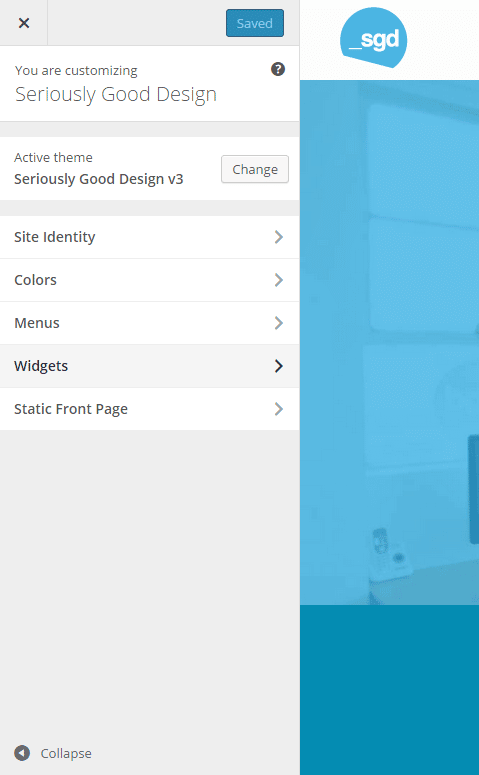
wp-4-3-1

You can now use the customiser to update an existing menu, create a new one and assign the menu a location, all while previewing the changes live.
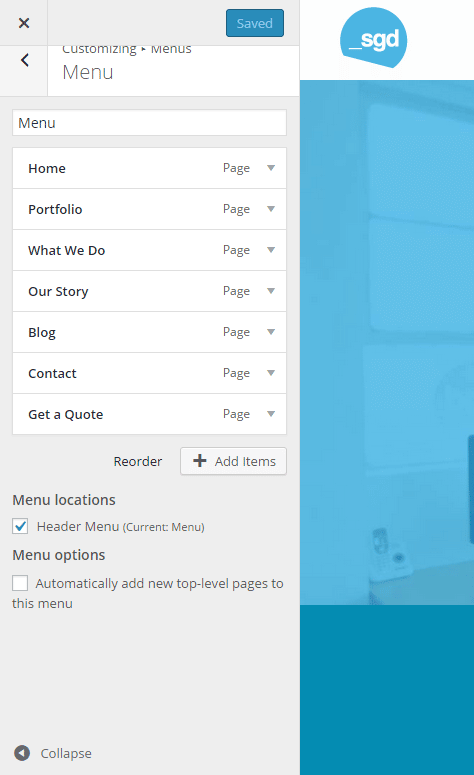
wp-4-3-2

Within the customiser you can also add or change your site icon, which is important in terms of brand identity because it appears everywhere on the Internet: in browser tabs, bookmark menus and on the home screen of mobile devices. If you switch themes, you don’t have to worry about adding in the site icon again, as it will stay in place.
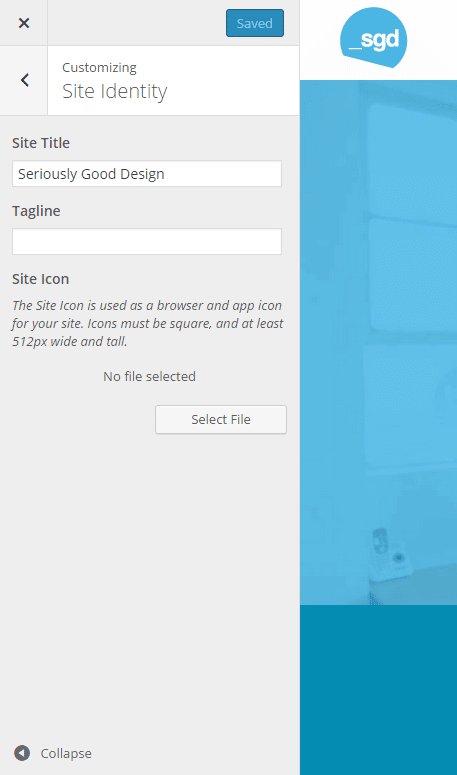
wp-4-3-3

As an added layer of security, WordPress 4.3 will now suggest stronger passwords by default when a user requests a password reset. Also, when adding a new user, WordPress will send them a link to setup a password instead of sending them passwords in plain text.

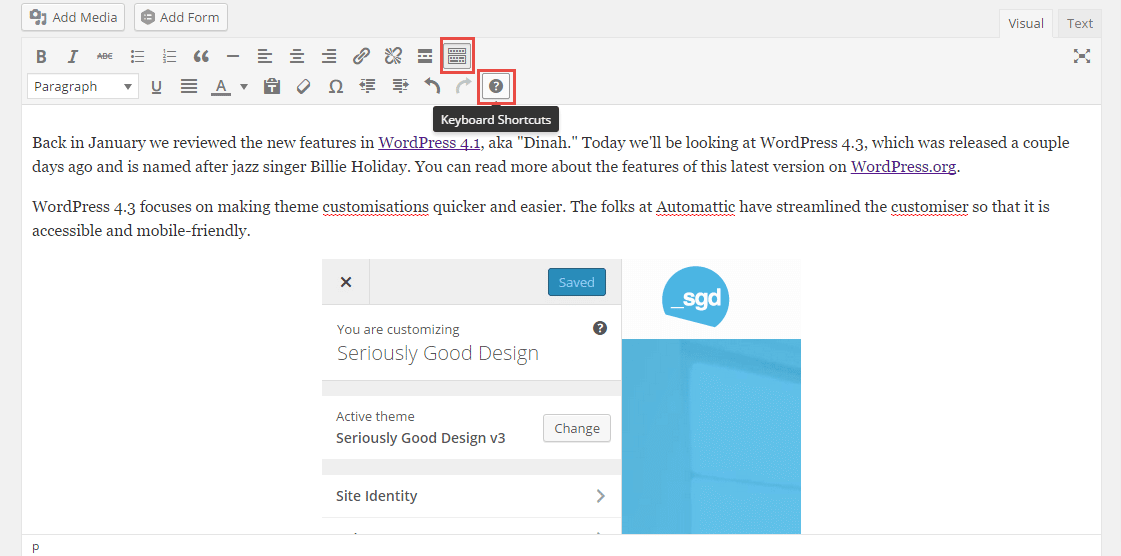
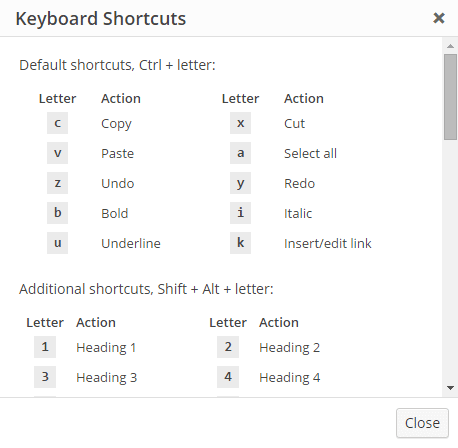
The visual editor in WordPress has definitely improved over the last few versions, but formatting the text still involved pressing buttons, which interrupts the flow of writing. WordPress 4.3 has introduced inline text shortcuts, which will automatically format text as you type. To see the complete list of shortcuts, click the Toolbar toggle icon at the top of the visual editor and then the help icon below it.
wp-4-3-4

wp-4-3-7

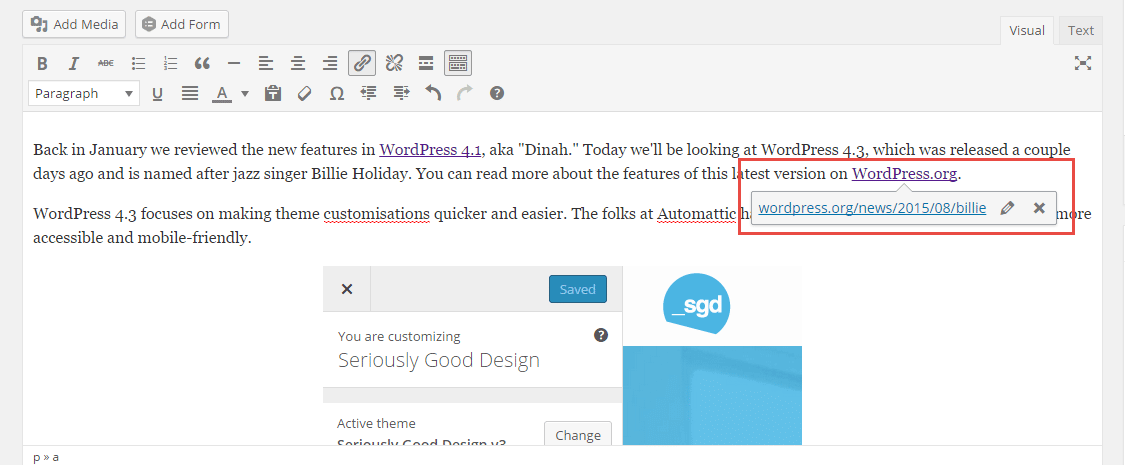
Additionally, you can now edit links in your posts more easily by clicking the buttons in the window that appears inline, instead of going up to the toolbar at the top of the visual editor.
wp-4-3-6

One issue that we’re really glad to see resolved is the fact that before version 4.3, WordPress had comments turned on by default for pages. Who wants people to comment on their static pages? Of course, you want comments only on your blog posts. Now when you upgrade to 4.3, comments will be turned OFF for pages by default.

In conclusion, we’re excited about WordPress 4.3 and we hope Automattic continues to make this platform as user-friendly as possible, while also improving the experience for us developers.

TIP: Be careful when updating your site to WP 4.3 so soon after its release, as not all plugins will be compatible with it. That’s why it’s important to back up your site as well as install plugins whose developers keep them up to date. Our monthly maintenance plans ensure that our clients receive priority site support when major updates are released.

Whether you are a WordPress newbie or pro, a custom WordPress theme can transform your business online by activating your brand and reaching potential customers you never knew you had. If you have a web project in mind, please don’t hesitate to get in touch with us for a free, no-obligation assessment of your needs and visions.

Share this article:

Author

James

James Fulton

Since founding the company in 2012, James has been the driving force behind SGD's success. As a visionary leader, he guides the SGD team, encouraging them to continually excel in digital design. James inspires a culture of growth, challenging each team member to surpass their own limits and set new standards in the field. This commitment to excellence not only propels personal development but also ensures SGD consistently delivers exceptional results for its clients.

Read more posts by James Fulton

Unlock Weekly Insights To Improve Your Website

Want to improve your website and digital marketing? Sign up to Marketing Monday for practical, up-to-date strategies on SEO, Google Ads, and website performance—delivered weekly.

This field is for validation purposes and should be left unchanged.

No fluff, just results-driven advice. Unsubscribe anytime.

Next Article

Roadmap showing free sites for stock photos

Best Place to Get High-Quality Stock Photos

August 19, 2015
Next
Website Content Guide: How to Prepare Content That Converts
AI Search & SEODigital MarketingUncategorized

Website Content Guide: How to Prepare Content That Converts

Performance Report of Google Search Console
Uncategorized

Benefits of SEO for Australian Service-Based Businesses

A laptop scrren in which a group meeting is going on.
Uncategorized

How Group Coaching Programs Get Better Results For Coaches and Their Clients

A man holding a camera to click photos
Uncategorized

How to take professional photos for your website

Ring light with a camera stand in a white room
Technology & AIUncategorized

Tips to upgrade your at-home video studio (without spending a fortune)

Figma custom web design
Uncategorized

WordPress Page Builder Review: Elementor, Bakery or Custom?

Start a Project

This field is for validation purposes and should be left unchanged.
How can we help your business?*
Please select one or many
This field is hidden when viewing the form
Start Now
Start Now

Tell us about your project

This field is for validation purposes and should be left unchanged.
How can we help your business?*
Please select one or many
This field is hidden when viewing the form
  • Digital Services
  • Our Portfolio
  • About Us
  • Contact Us
  • Latest News

Services

  • Digital Strategy Workshop
  • Website Growth Plans
  • Website Design That Gets Seriously Good Results
  • Custom WordPress Website Development
  • Search Engine Optimisation (SEO)
  • Google Ads Management Services
  • Digital Marketing Consultant
  • Website Maintenance & Support

Useful Links

  • Web Design Process
  • Web Design Pricing
  • Four Pillars of SEO
  • Digital Marketing Strategy Guide
  • Web Design & Marketing Blog
  • Marketing Monday Newsletter
  • Digital Marketing Tools
  • About Us
  • Terms of Service
  • Privacy

Recent Blogs

  • Keyword Research: How to Choose Keywords For Your SEO Campaign
  • SEO 101: The Four Pillars of Effective SEO
  • How to Secure Your WordPress Website
  • Benefits of Hiring a Digital Marketing Consultant for Online Business Success
  • A Comprehensive Guide to Optimal Background Image and Video Sizes for Your Website
  • 8 Common Reasons for Drop in Your Website Traffic

Get In Touch

+61 3 4320 5687 +61 483 960 585 hello@sgd.com.au 88 Langridge St, Collingwood VIC 3066, Australia


Google Partner

© Copyright 2010 - 2026 Seriously Good Design PTY LTD.

ABN 63 166 835 392

Made with love in Melbourne, Australia

  • Melbourne Website Design Agency
  • Sydney Website Design Agency
  • Sydney Website Design Agency
  • Box Hill Website Design Agency
  • Brighton Website Design Agency
  • Brunswick Website Design Agency
  • Camberwell Website Design Agency
  • Carlton Website Design Agency
  • Doncaster Website Design Agency
  • Fitzroy Website Design Agency
  • Hawthorn Website Design Agency
  • Kew Website Design Agency
  • Richmond Website Design Agency
  • South Yarra Website Design Agency
  • St Kilda Website Design Agency
  • Surrey Hills Website Design Agency
  • Toorak Website Design Agency