SGD
  • About
    • About SGD
    • Our Process
    • What Sets Us Apart
    • Testimonials
  • Portfolio
  • Case Studies
  • Services
    • Strategy
      • Digital Strategy icon
        Digital Strategy Workshop
    • Websites
      • Website Design icon
        Website Design
      • eCommerce Websites icon
        eCommerce Websites
      • WordPress Development icon
        WordPress Development
    • Marketing
      • SEO Services icon
        SEO Services
      • Google Ads icon
        Google Ads
      • Website Growth Plans icon
        Website Growth Plans
    • Support
      • Website Support icon
        Website Support
  • Resources
    • Insights
      • Read the Blog
      • The Four Pillars of SEO
      • WordPress Website Checklist
      • How to Optimise a Landing Page
    • Tools & Guides
      • Website Pricing
      • AI SEO Checklist
      • Google Ads Guide
      • Weekly Marketing Tips

    AI-Ready SEO Checklist

    Download

    AI Ready SEO Checklist Cover
  • Contact
Book a call
Menu

Blog

SGD Review of WordPress 4.0

Business
James

Written by: James Fulton

Last updated: January 8, 2025
SGD Review of WordPress 4.0

WordPress 4.0 has been available for about two weeks now and we have to say that, while it’s not a huge step forward like WordPress 3.0, it does represent an improvement on the previous version.

First of all, it has an apt nickname: “Benny,” after jazz clarinetist and bandleader Benny Goodman, who introduced America to swing music and the mixed-race band. Like Goodman’s music, WordPress 4.0 helps you “smooth your groove” as you work on your site. (I’m listening to “Sing Sing Sing” as I type this).

Let’s take a tour of Benny and see what the folks at WordPress have created for us…

1. Sticky Visual Editor

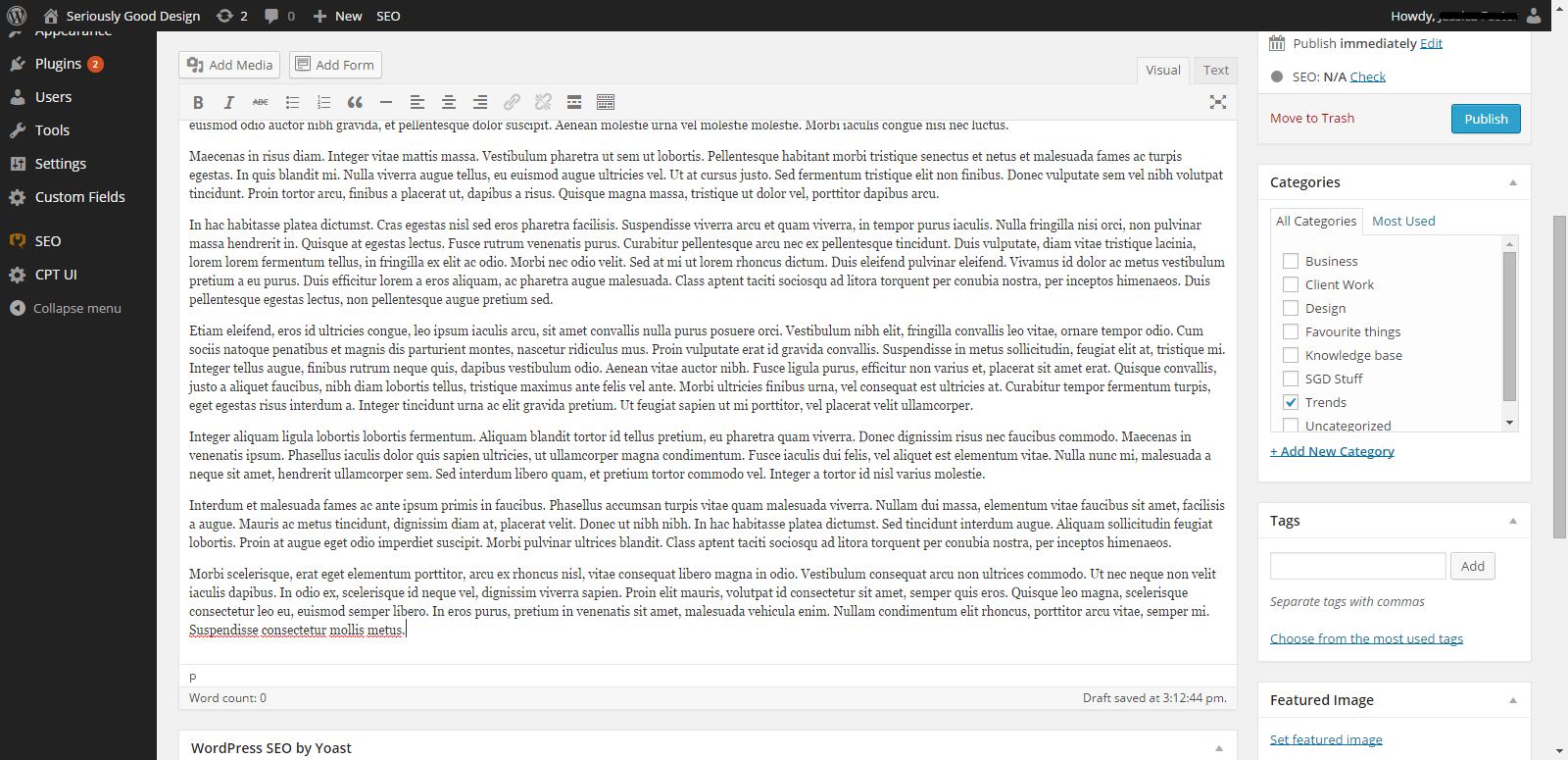
In WordPress 4.0, the editor is now content aware and expands automatically as you write. In conjunction, the formatting tools on the right of the screen are “sticky,” meaning that they remain in view even while you manipulate the page, such as by scrolling.
wp4 - pic1
As you can see, the edit box doesn’t move until you reach the end of the post because the edit box scroll bar has been superseded by the page scroll bar.

2. Media Library Grid

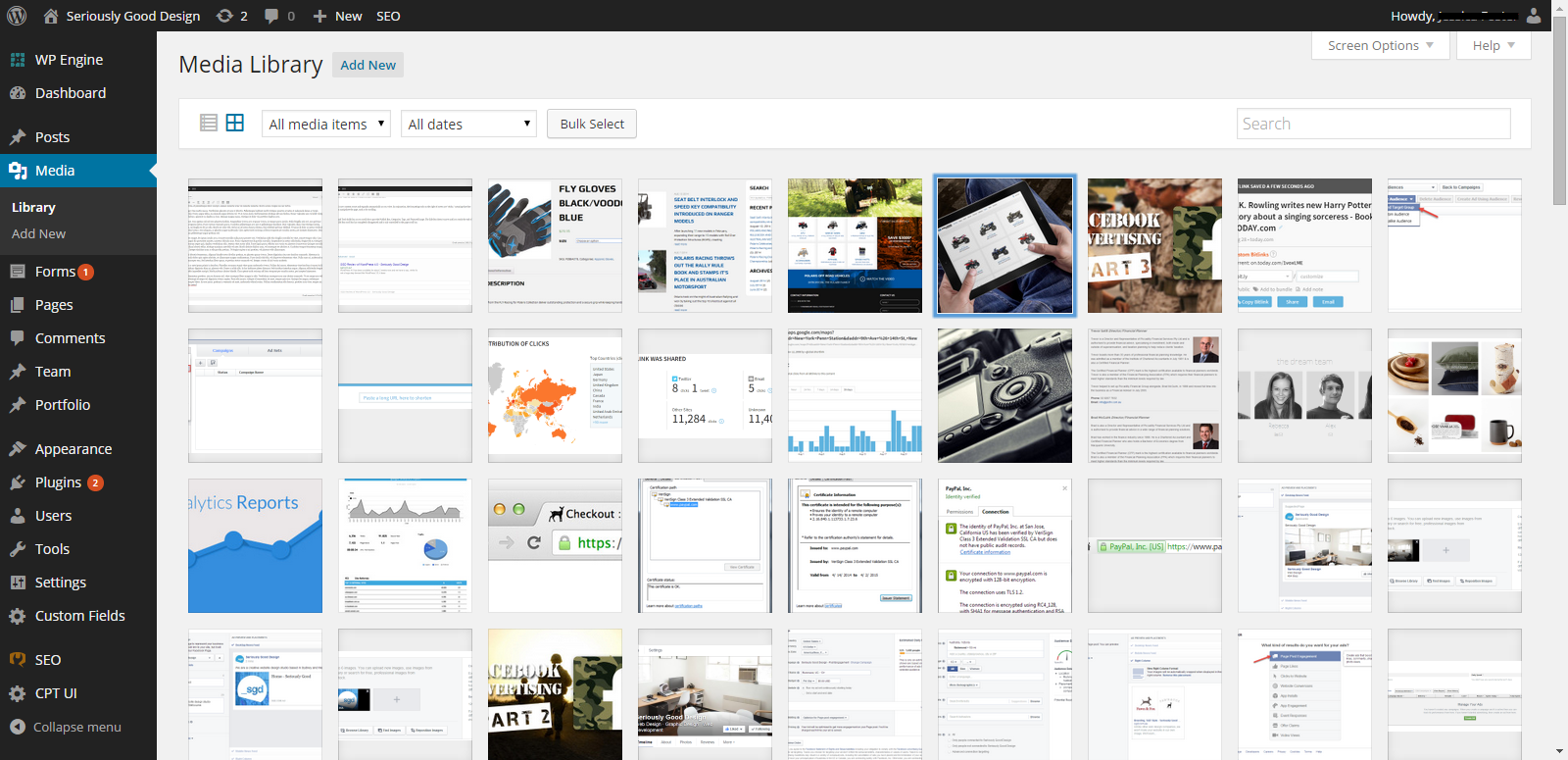
Instead of a hard-to-browse list of media attachments, the Media Library in WordPress 4.0 is now laid out like the Media Manager, on an endless grid. You can even drag and drop images straight into the Media Library without clicking Upload.
wp4 - pic2

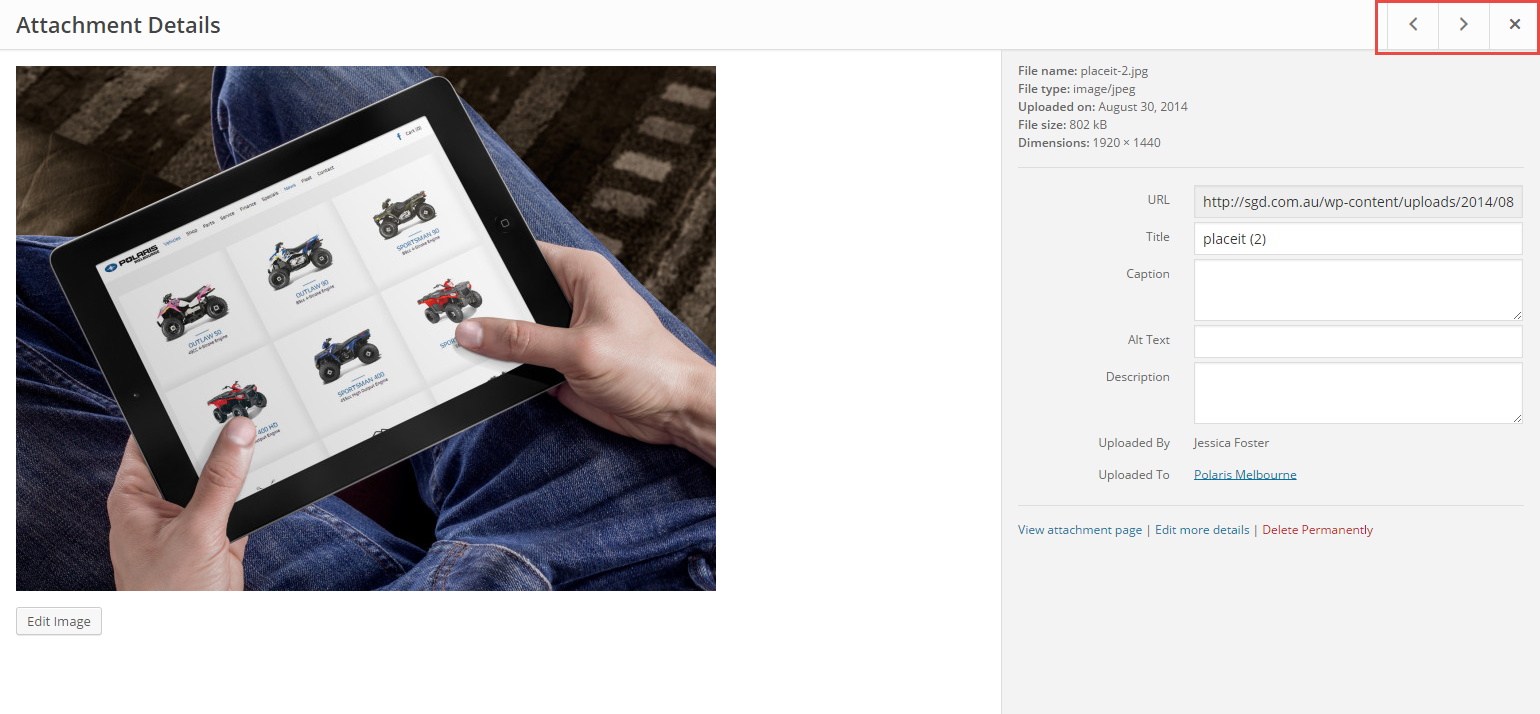
Attachment details are now opened with a modal window instead of a separate page. The forward and backward arrows allow you to easily navigate to other images.
wp4 - pic3

3. View Embedded Media

In WordPress 4.0, you can now see a true preview of your embedded content within the editor itself instead of having to click on the preview button. Unfortunately, this only works with URLs, not with embed code.

4. Search for Plugins (without pulling your hair out)

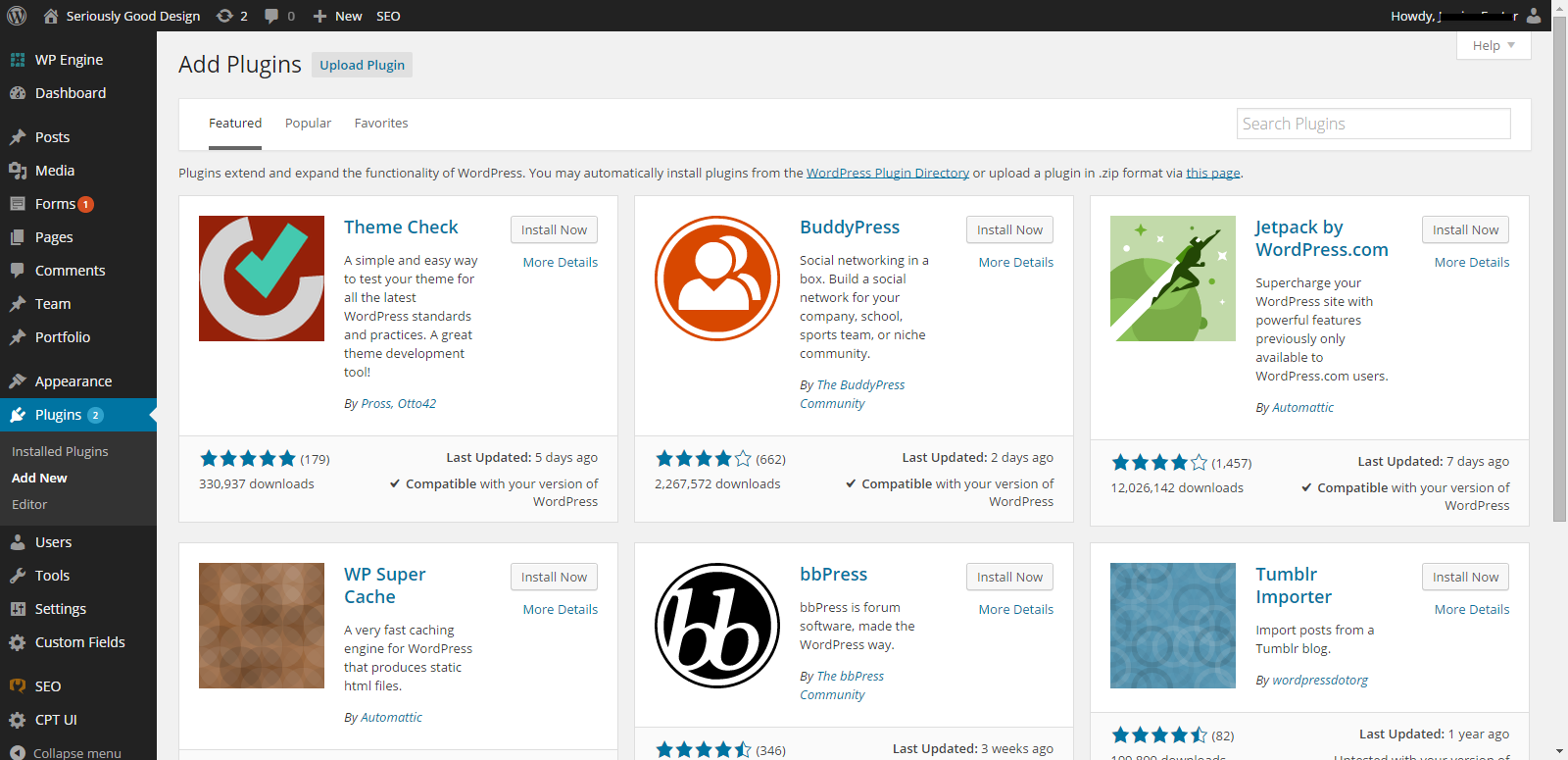
You can now find the right plugin from among the more than 30,000 free and open source plugins using new metrics, improved search and an overall more visual browsing experience.
wp4 - pic4

Of course WordPress 4.0 isn’t perfect, but we give props to WordPress for continually working to improve their user interface. We encourage you to give 4.0 a whirl!

Share this article:

Author

James

James Fulton

Since founding the company in 2012, James has been the driving force behind SGD's success. As a visionary leader, he guides the SGD team, encouraging them to continually excel in digital design. James inspires a culture of growth, challenging each team member to surpass their own limits and set new standards in the field. This commitment to excellence not only propels personal development but also ensures SGD consistently delivers exceptional results for its clients.

Read more posts by James Fulton

Unlock Weekly Insights To Improve Your Website

Want to improve your website and digital marketing? Sign up to Marketing Monday for practical, up-to-date strategies on SEO, Google Ads, and website performance—delivered weekly.

This field is for validation purposes and should be left unchanged.

No fluff, just results-driven advice. Unsubscribe anytime.

Next Article

4 Benefits of Professional Photography for Your Website

4 Benefits of Professional Photography for Your Website

August 27, 2014
Next
Mission and Vision: The Clarity Most Businesses Need
Marketing MondayBusiness

Mission and Vision: The Clarity Most Businesses Need

DIY VS Professional WordPress Development Services in Melbourne
Business

DIY VS Professional WordPress Development Services in Melbourne

Why Every Business Needs CRM
Marketing MondayBusiness

Why Every Business Needs CRM

Do You Have a Traffic Problem or a Conversion Problem?
Marketing MondayBusinessDigital Marketing

Do You Have a Traffic Problem or a Conversion Problem?

Quick Tip: Speak Your Ideas with MacWhisper
Marketing MondayBusinessTechnology & AI

Quick Tip: Speak Your Ideas with MacWhisper

Upgrade Your AI Prompts with the CRIT Framework
Marketing MondayBusinessTechnology & AI

Upgrade Your AI Prompts with the CRIT Framework

Start a Project

This field is for validation purposes and should be left unchanged.
How can we help your business?*
Please select one or many
This field is hidden when viewing the form
Start Now
Start Now

Tell us about your project

This field is for validation purposes and should be left unchanged.
How can we help your business?*
Please select one or many
This field is hidden when viewing the form
  • Digital Services
  • Our Portfolio
  • About Us
  • Contact Us
  • Latest News

Services

  • Digital Strategy Workshop
  • Website Growth Plans
  • Website Design That Gets Seriously Good Results
  • Custom WordPress Website Development
  • Search Engine Optimisation (SEO)
  • Google Ads Management Services
  • Digital Marketing Consultant
  • Website Maintenance & Support

Useful Links

  • Web Design Process
  • Web Design Pricing
  • Four Pillars of SEO
  • Digital Marketing Strategy Guide
  • Web Design & Marketing Blog
  • Marketing Monday Newsletter
  • Digital Marketing Tools
  • About Us
  • Terms of Service
  • Privacy

Recent Blogs

  • Keyword Research: How to Choose Keywords For Your SEO Campaign
  • SEO 101: The Four Pillars of Effective SEO
  • How to Secure Your WordPress Website
  • Benefits of Hiring a Digital Marketing Consultant for Online Business Success
  • A Comprehensive Guide to Optimal Background Image and Video Sizes for Your Website
  • 8 Common Reasons for Drop in Your Website Traffic

Get In Touch

+61 3 4320 5687 +61 483 960 585 hello@sgd.com.au 88 Langridge St, Collingwood VIC 3066, Australia


Google Partner

© Copyright 2010 - 2026 Seriously Good Design PTY LTD.

ABN 63 166 835 392

Made with love in Melbourne, Australia

  • Melbourne Website Design Agency
  • Sydney Website Design Agency
  • Sydney Website Design Agency
  • Box Hill Website Design Agency
  • Brighton Website Design Agency
  • Brunswick Website Design Agency
  • Camberwell Website Design Agency
  • Carlton Website Design Agency
  • Doncaster Website Design Agency
  • Fitzroy Website Design Agency
  • Hawthorn Website Design Agency
  • Kew Website Design Agency
  • Richmond Website Design Agency
  • South Yarra Website Design Agency
  • St Kilda Website Design Agency
  • Surrey Hills Website Design Agency
  • Toorak Website Design Agency