




If you’re confused about how categories and tags work in WordPress, you’re not alone! Many users struggle initially with these tools, but once you get the hang of them, you’ll find that they do a great job of organising your blog posts, images, portfolio items and even products. And good organisation automatically sets your website above the rest in terms of user-friendliness. Sites that are well-structured and easy to navigate will attract and keep more readers and customers than ones that take you through a maze of scattered content and don’t allow you to search for what you want.
Let’s go through some of the most commonly asked questions about categories and tags, using a web agency website as an example.
What’s the difference between categories and tags?
Originally WordPress had only categories, which allowed you to group posts under general headings, such as “Tutorials,” “Marketing” and “News,” so that your readers could easily search your blog by topic. However, if you wanted to be more specific, you’d have to add more categories. Eventually your blog would become too unwieldy for you to manage and too confusing for your readers to use.
Later WordPress introduced tags. While similar to categories, tags are not linked to categories and they are not hierarchical. In fact, you don’t have to use them at all, whereas all blog posts must be assigned to at least one category (even if it’s the default “Uncategorized”). Tags describe details of your post, such as “Facebook” or “eCommerce.”
If you’ve having trouble visualising the differences between categories and tags, think of your website as a book. The categories represent the table of contents, while the tags represent the index at the back.
How many categories and tags should I have?
It’s best to have as few categories as possible, because they’re supposed to be quite broad (though not to the point of vagueness). When creating categories, make a list of 5 or 6 high-level words that describe your blog. Make sure that every post falls under one of those headings. If a category contains only one or two posts, either plan on writing more articles under that heading or rename the category to encompass more posts.
Once you’ve settled on 5 or 6 categories, you can go about creating sub-categories, which are like sub-headings and are hierarchically linked to the main categories. So if you had a category named “Tutorials,” you could add sub-categories under it such as “WordPress” and “Adobe Photoshop.” Under the category “Marketing,” you could add “Facebook Advertising” and “Google AdWords.”
As we mentioned, tags are optional, but they can come in handy if there are some specific words people might search for, regardless of category. They loosely group related posts. Examples could be “plugins,” “logo,” “website builders,” “PayPal,” etc. You’ll notice that these wouldn’t work well as categories for our fictional web agency site because they’re all over the place and they don’t really describe the main topics of the blog. But they make it easy for readers to find a post related to a specific word. Assign as many tags as you want; just make sure they’re relevant to the post.
How do I add categories and tags?
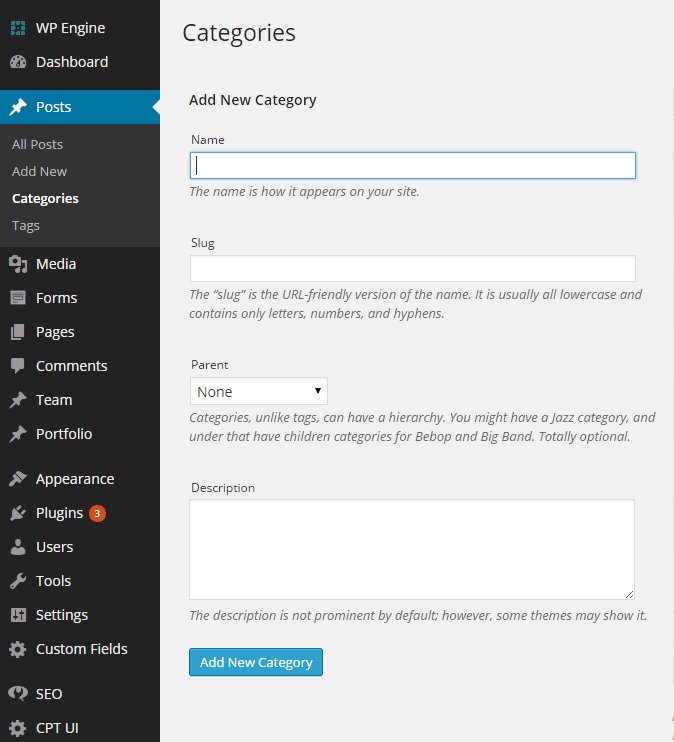
Under Posts on your Dashboard, click Categories. Add a name, slug (if desired) and a description. If you want this to be a subcategory, click the drop-down menu under Parent and select the category that you want to be the parent of this subcategory. Then click the blue Add New Category button.
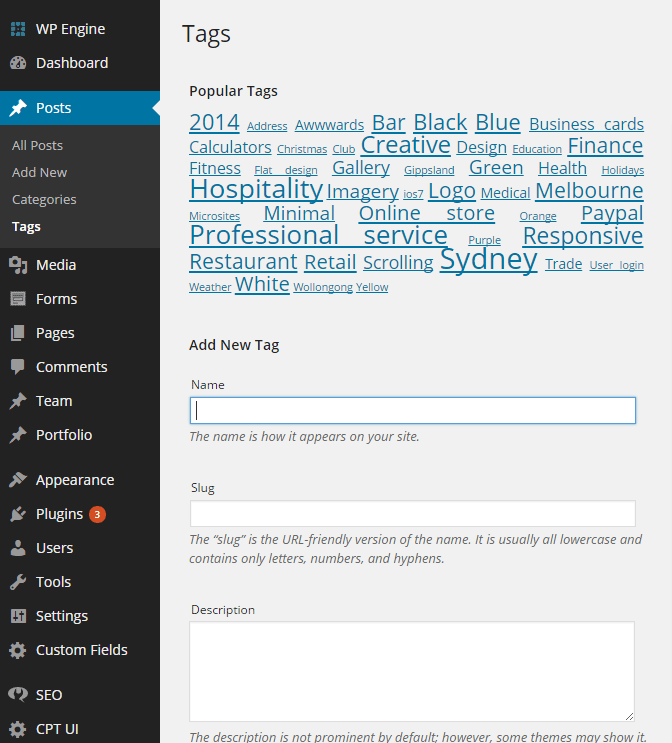
To create a new tag, click Tags under Posts in your Dashboard and add in the name, slug (if desired) and description. Then click the blue Add New Tag button.
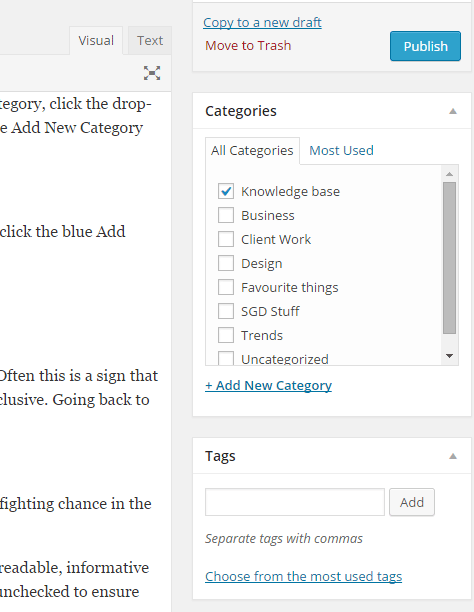
You can also add categories within the Post Editor by checking an existing category or clicking Add New Category. Tags are located just below the Categories box; you can add a new tag or choose from the most used ones.
Can I assign one post to multiple categories?
Technically, yes, but you need to be judicious here. Ask yourself, why do you need to place the post in more than one category? Often this is a sign that you need to broaden your existing categories or add subcategories. As a general rule, top-level categories should be mutually exclusive. Going back to the website-as-a-book analogy, would you list a chapter (post) in two different locations in the table of contents?
How do I optimise categories and tags for SEO?
First of all, install a plugin like WordPress SEO by Yoast. It’s free and it comes with a lot of great features to give your website a fighting chance in the search engine rankings.
After installing Yoast, click Titles & Metas in the SEO menu on your Dashboard. Then click the Taxonomies tab. Here we’ve set readable, informative title templates for each taxonomy type (in our case Categories, Tags, Format and Services) and left the “noindex, follow” boxes unchecked to ensure that search engines will follow the pages and include them within their index.
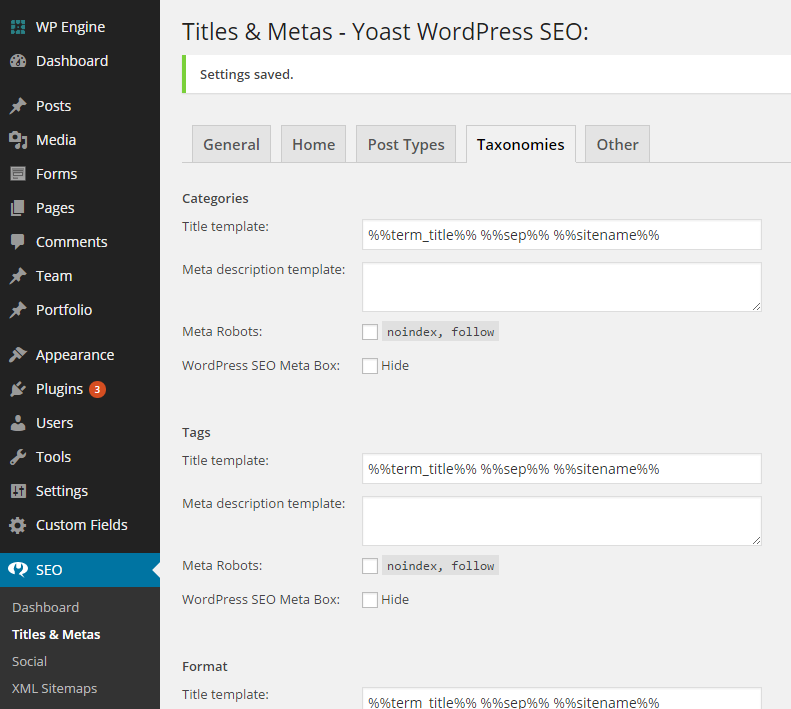
Remember, tags are NOT meta keywords. You must install a special plugin (such as Yoast) to configure the tags to do double-duty as SEO keywords.
Can I use categories and tags for other things besides blog posts?
Yes, that’s the great thing about WordPress: it treats everything like blog posts, so it’s easy to categorise and tag just about anything, including the products in your online store and the work samples in your portfolio. For instance, in our Portfolio we often use tags like “blue,” “responsive,” or “Sydney.” These specify aspects of our custom websites that people might want to hone in on.
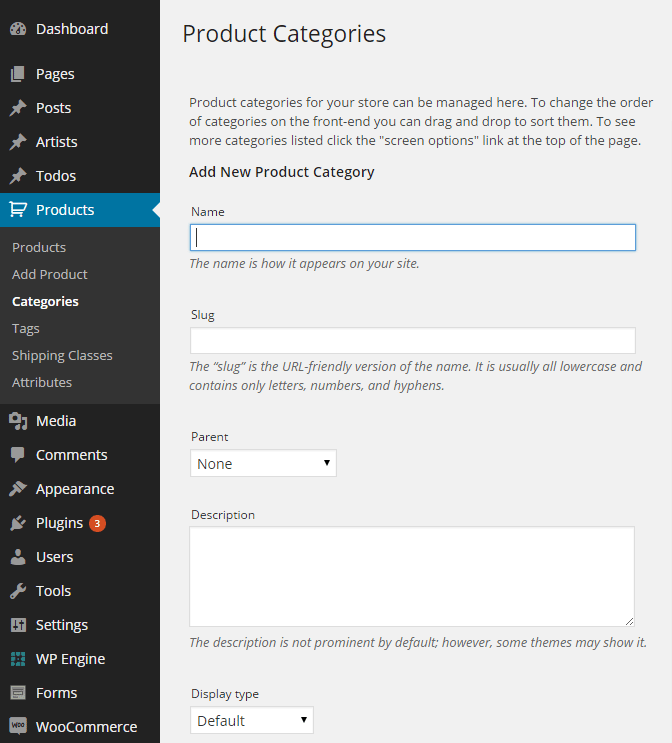
If you install a plugin like WooCommerce, you can add categories, subcategories and tags to your products. You’ll notice that the format is almost identical to that of regular post categories.
We hope this article has helped to clarify the subject of categories and tags for you, but if you still need assistance, feel free to ask more questions in the comments below or contact us directly.
Feature image © MichaelJayBerlin


